Projects
Projects are the primary organizational unit in ActionsManager, grouping related repositories for coordinated workflow management.
Table of contents
What is a Project?
A project in ActionsManager is a named collection of repositories that share a workflow management scope. Projects are the unit you operate on — permissions, workflows, secrets, and rollouts are all coordinated at the project level.
Instead of managing workflows repository by repository, you group related repositories into a project and apply changes to all of them in a single operation.
Project Types
ActionsManager uses two project types that reflect the two sides of GitHub Actions reusability:
Caller Workflow Project
A Caller Workflow Project (referred to internally as standard) manages the repositories whose workflows call reusable workflows using the uses: directive.
Use this project type when you want to:
- Manage multiple repositories that share a common workflow pattern
- Apply, update, or remove caller workflows across a fleet of repositories
- Keep all repositories synchronized against a shared workflow definition
Reusable Workflow Project
A Reusable Workflow Project (referred to internally as rwx) manages the producer side — the repository that defines and publishes the reusable workflows that other repositories call.
Use this project type when you want to:
- Author and version reusable workflow definitions centrally
- Track which caller workflows across your organization reference your reusable workflows
- Propagate changes from the producer to all consumers
Working Together
The real power of ActionsManager comes from managing both project types together. When a reusable workflow changes in a producer project, ActionsManager identifies which caller projects are affected and can roll out the update across the entire consumer fleet.
Creating a Project
- Click New Project in the dashboard
- Choose a project type (Caller Workflow or Reusable Workflow)
- Name the project
- Add repositories to the project
Managing Repositories
Within a project you can:
- Add repositories — include repositories from your GitHub account or organizations
- Remove repositories — take a repository out of scope without deleting its workflows
- Configure per-repository settings — specify branches, labels, and delivery preferences
Adding a Repository to a Project That Already Has Workflows
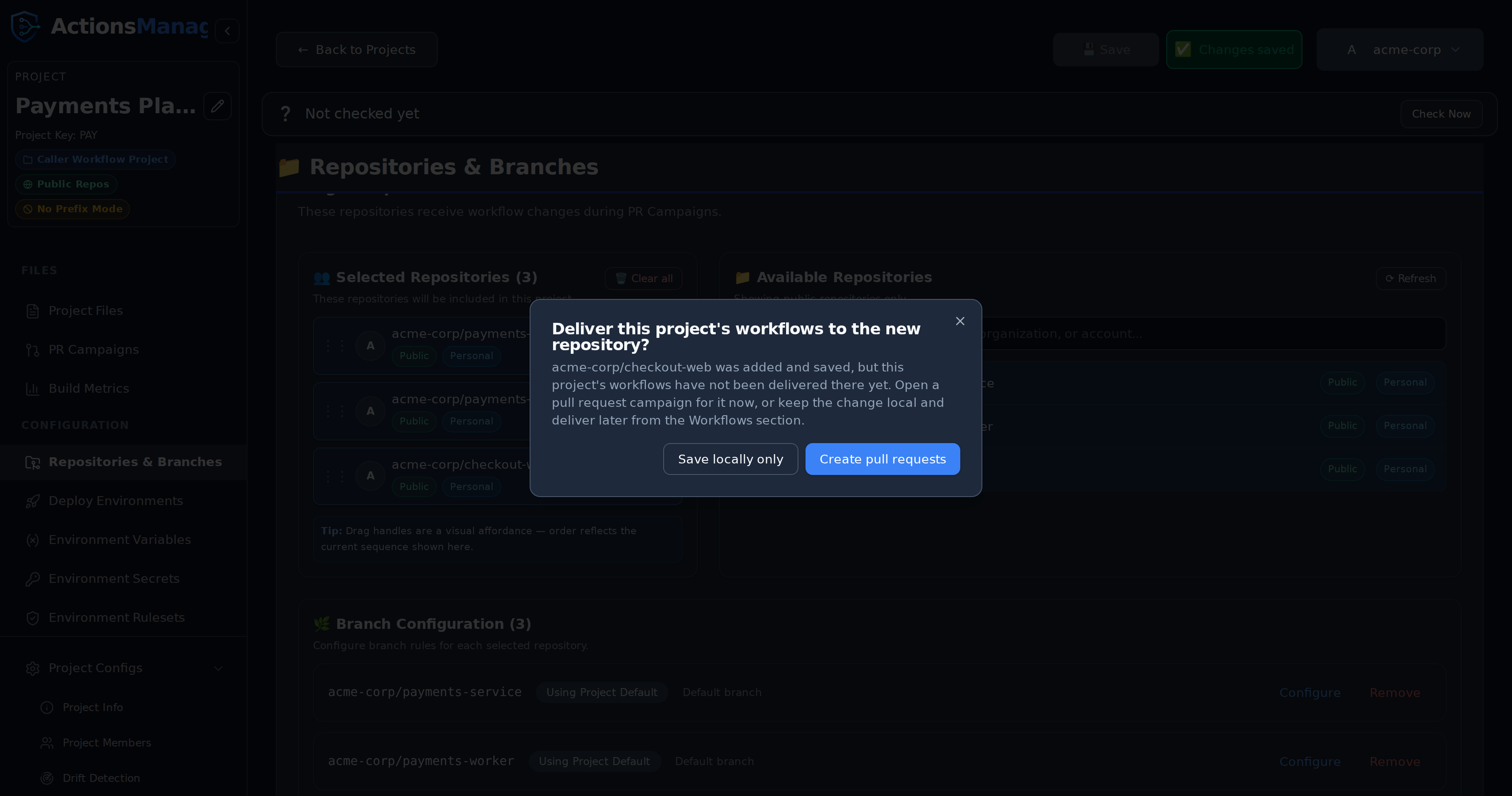
Adding a repository does not push anything to it. The repository joins the project’s scope, but the project’s existing workflows are not in it yet — and because nothing has ever been delivered there, it is not reported as drift either. Without a prompt, a newly added repository could sit empty indefinitely with nothing saying so.
So when you press Save in Repositories & Branches having added one or more repositories, ActionsManager asks how to apply the project’s workflows to them:
| Choice | What happens |
|---|---|
| Save locally only | Nothing is pushed. The repository stays in the project, and no drift is reported. Deliver whenever you’re ready from the Workflows section. |
| Create pull requests | Opens a PR campaign limited to the repositories you just added. Every workflow in the project is pre-selected, because the new repository has none of them. |
Dismissing the prompt is the same as choosing Save locally only — the repository was already saved before the prompt appeared, so nothing is lost either way.
Keeping Track of What’s Still Waiting
Choosing Save locally only is not the end of the story, so ActionsManager keeps a standing reminder until the workflows land. It appears in three places, each a different level of detail:
- A count beside Repositories & Branches in the sidebar, so the reminder is reachable from anywhere in the project.
- A note at the top of the project, next to the drift status row, naming the repositories and offering to open the pull requests.
- A “Not delivered yet” badge on each waiting repository in the Selected Repositories list.
None of it is styled as a warning, because nothing is wrong — the repository simply hasn’t received the files yet. All three clear themselves: opening a pull request pauses the reminder while it is in review, and merging it removes the repository from the list for good.
The reminder only appears for repositories ActionsManager has genuinely never delivered to. It stays quiet on a project that has never been drift-checked, because until the first check there is no evidence either way, and guessing would mean telling you that repositories you delivered to months ago are still waiting.
Two things the campaign does not carry:
- Custom files that are already synced elsewhere. A campaign only offers custom files with pending changes, so a file already delivered to the project’s other repositories is not automatically copied to the new one. Edit it to include it in a campaign.
- Reusable workflow definitions. Those live in the producer repository, not in the caller repositories, so a new caller repository does not need them pushed to it.
Removing a repository never prompts — there is nothing to deliver.
Branch Configuration
Repositories & Branches decides which branches a project writes to. The same answer is used for drift detection, so a project is always compared against the branches it actually delivers to — never against a branch nobody chose.
| Option | What it targets |
|---|---|
| Default branch | Each repository’s own GitHub default branch |
| Branch name or pattern | Every branch matching the name or regular expression you enter (main, release-.*, feature/auth) |
Pattern mode adds a Max branch age (1–30 days, 30 by default): only branches with a commit inside that window are targeted, so stale branches matching the pattern are left alone. If a pattern matches nothing — or every match is older than the window — ActionsManager falls back to the repository’s default branch.
Per-repository override. Each repository in the list either uses Use project default or Override for this repository, which gives that one repository its own option, pattern and age window. Everything else in the project keeps the project setting.
Ordering Projects
The Projects dashboard keeps the arrangement you choose. Drag a card by its grip handle (to the left of the three-dot menu) and drop it anywhere in the grid.
- Opening or editing a project no longer moves its card. The dashboard used to sort by last-updated time, so simply viewing a project pushed it to the front.
- Your order is your own. It is saved per user, so rearranging your dashboard never changes what a teammate sees.
- It follows you. The order persists across refreshes, sessions, browsers and devices, because it is stored on the server rather than in the browser.
- New projects appear at the end, so an existing arrangement is never disturbed.
- Reordering is disabled while searching or filtering. A filtered grid only shows some of your projects, and saving from that view would lose the position of the hidden ones. Clear the filters to re-enable the handles — your full order is preserved while filtering.
Dragging never opens a project: clicking a card still navigates, and the three-dot menu keeps working as before. If an order fails to save, the grid returns to its previous arrangement and shows an error rather than leaving the dashboard and the server out of step.
The first time you open the dashboard, projects are arranged most-recently-updated first and that arrangement is saved as your starting point.
Project Permissions
Access to a project is tied to your GitHub authentication. You can only manage repositories that your configured GitHub token or OAuth session can access.
Related Topics
- Workflows — manage workflow content across project repositories
- PR Campaigns — roll out changes through reviewable pull requests
- Drift Detection — detect when repositories diverge from the managed state
- Reusable Workflows — manage producer-consumer workflow relationships