PR Campaigns
Roll out workflow changes across many repositories simultaneously through coordinated pull requests.
What is a PR Campaign?
Section titled “What is a PR Campaign?”A PR campaign is a coordinated operation that opens a pull request in every repository in a project simultaneously. Instead of manually creating a pull request in each repository, ActionsManager creates them all in a single bulk action with consistent metadata.
PR campaigns are the recommended delivery method for rolling out workflow changes in a reviewable and auditable way.
How a PR Campaign Works
Section titled “How a PR Campaign Works”- Define the change — create or update a workflow in your project
- Start the campaign — ActionsManager opens a pull request in each repository in scope
- Review and merge — repository owners review the PRs individually, or you bulk-merge from ActionsManager
- Track progress — the campaign dashboard shows which PRs are open, merged, or closed
Creating a PR Campaign
Section titled “Creating a PR Campaign”- Navigate to your project and select a workflow
- Make your changes in the workflow editor
- Choose PR-based delivery
- Configure PR settings:
- Branch name
- PR title
- PR description / commit message
- Click Create PRs
ActionsManager creates a pull request in each repository using the configured GitHub token. All PRs share the same title, description, and branch name for consistency.
A campaign does not have to cover the whole project. Adding a repository to a project offers a campaign scoped to just that repository, so the repositories already in sync are left alone.
Starting a campaign requires editor access to the project. A campaign commits files and opens pull requests in every repository in scope, so project viewers can open the project and read the workflow but the campaign is rejected. Project owners and workspace admins always qualify — see Permissions.
Campaign Dashboard
Section titled “Campaign Dashboard”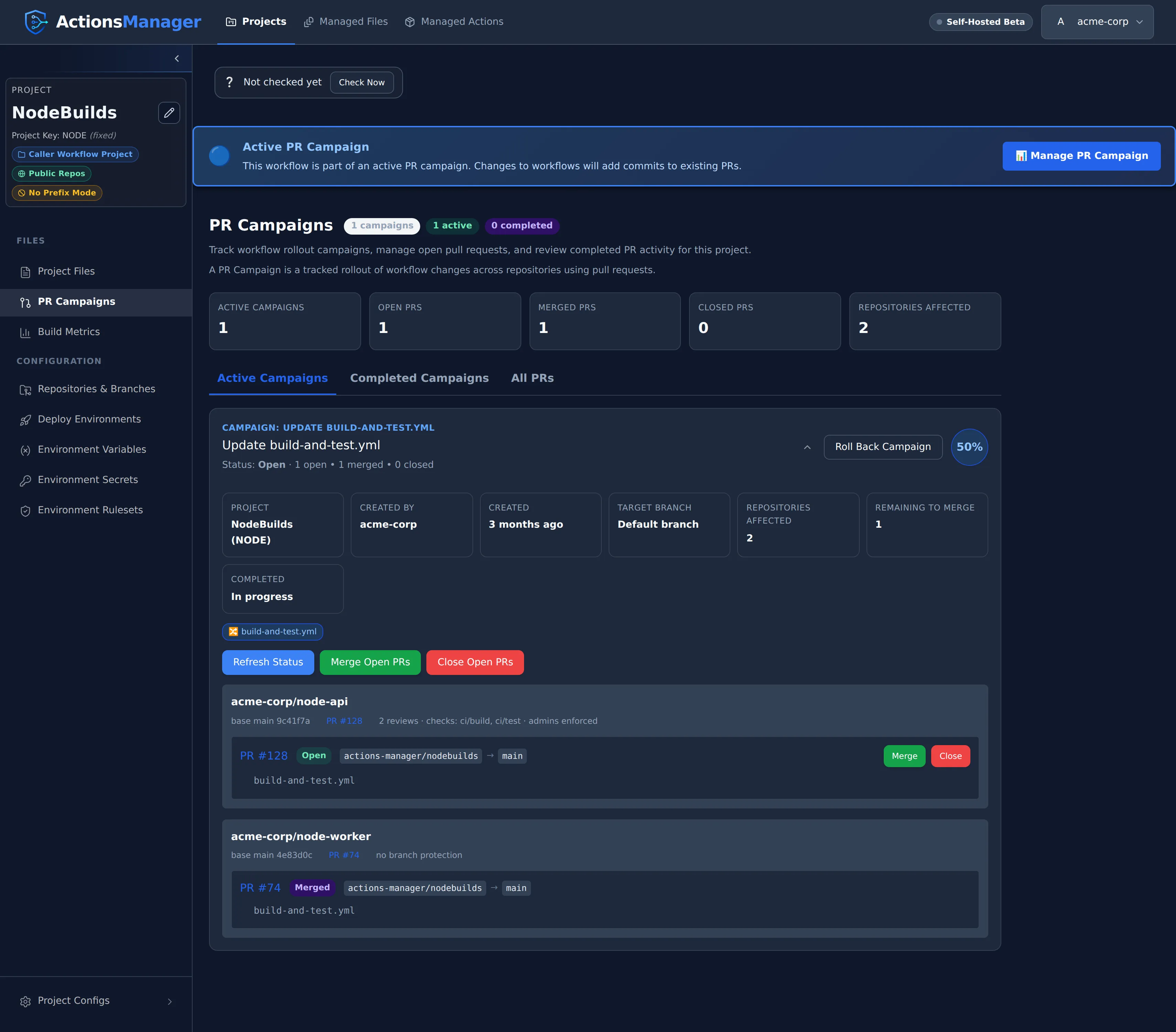
The campaign dashboard shows:
- Total repositories in scope
- PRs opened, merged, closed
- Individual PR status per repository
- Links to each PR on GitHub
Each campaign card carries the completion percentage and, once anything has merged, Roll Back Campaign in its header.
The tiles below the header describe the rollout itself:
| Tile | What it means |
|---|---|
| Target branch | The branch mode the project is configured with, not the branch it resolved to — Default branch means each repository is targeted on its own default, which may differ per repository. Hover to see the branches actually used. |
| Repositories affected | How many repositories opened a pull request. If a target opened none, this reads 2 of 3 targeted so the shortfall is visible without counting rows. |
| Remaining to merge | Pull requests still open. |
What was captured when the campaign was created
Section titled “What was captured when the campaign was created”Under each repository name the card shows the state that repository was in at the moment the campaign went out:
- The base branch and commit the pull request was cut from —
base main 9c41f7a. The branch is named because a project onDefault branchtargets a different branch in each repository. - A link to the pull request opened against that target.
- The branch protection in force at the time — required reviews and status checks, or
no branch protection.
A repository that was targeted but never opened a pull request still appears,
marked No PR opened, rather than silently vanishing from the list.
Bulk Operations
Section titled “Bulk Operations”From the campaign dashboard you can:
- Bulk merge — merge all open PRs that have required checks passing
- Bulk close — close all open PRs without merging
- Sync status — refresh PR state from GitHub
Merging and closing require editor access, like the campaign itself, and reach only the pull requests ActionsManager opened for this project — a pull request it has no record of is refused rather than acted on.
PR Metadata
Section titled “PR Metadata”ActionsManager adds consistent metadata to campaign PRs:
- Standardized branch names (e.g.,
actions-manager/update-workflow) - Descriptive PR titles and bodies
- Labels for tracking and filtering
Rolling a Campaign Back
Section titled “Rolling a Campaign Back”Closing a campaign’s still-open PRs is enough to stop a rollout that has not landed. Once PRs have merged, use Roll Back Campaign on the campaign card instead — it generates the inverse of the change and delivers it the same way the original went out.
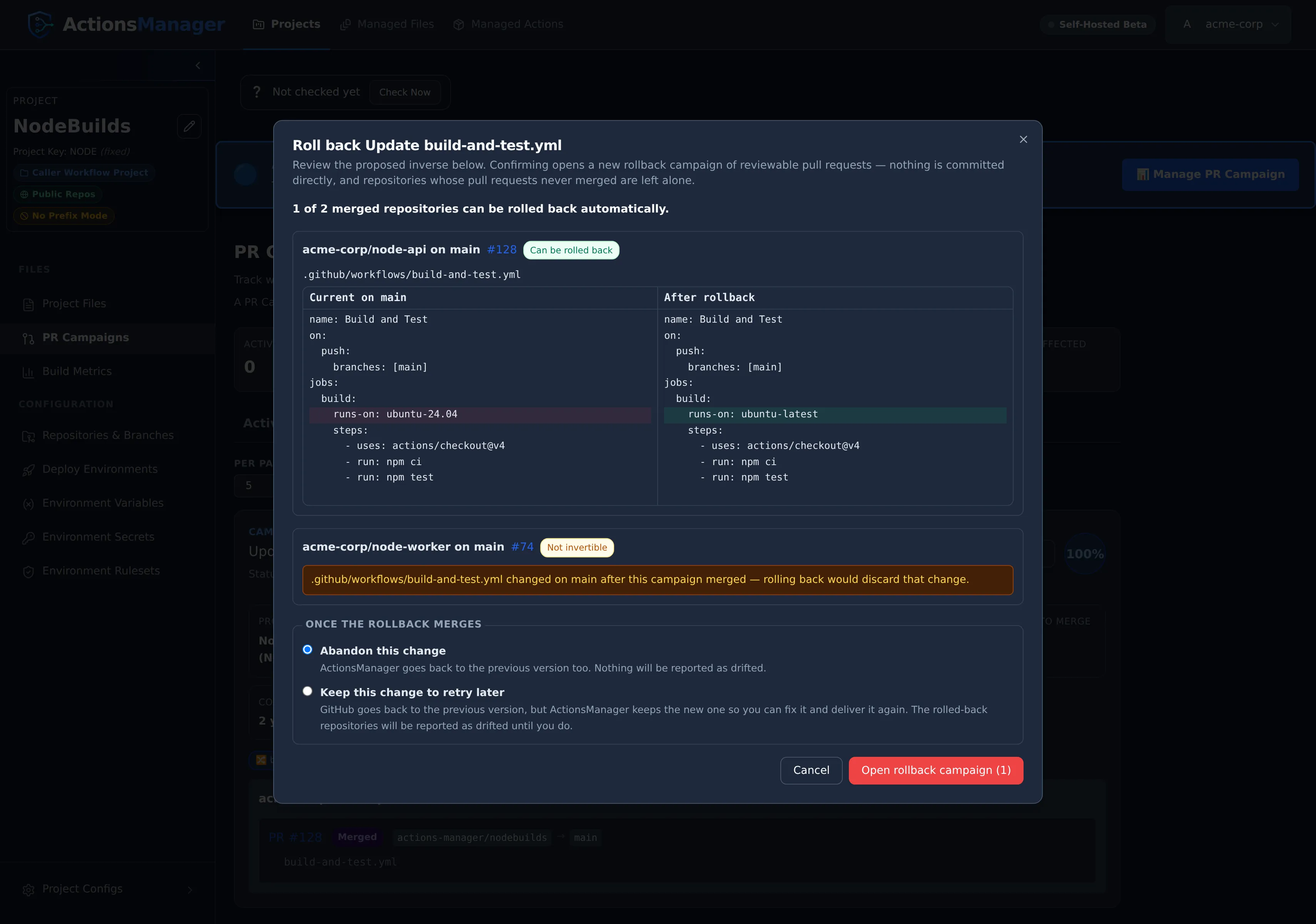
- Preview — ActionsManager reads each merged pull request on GitHub and works out what the repository looked like immediately before that PR merged. The proposed inverse is shown as a diff, per repository and per file, before anything is created.
- Say whether you are done with the change — a rollback puts the old content back in GitHub while ActionsManager still holds the new content, so it asks which one you meant. Either:
- Abandon this change — ActionsManager goes back to the previous version too, so nothing is reported as drifted; or
- Keep this change to retry later — GitHub goes back to the previous version but ActionsManager keeps the new one, so you can fix it and deliver it again. Drift detection reports the rolled-back repositories until you do.
- Confirm — a new rollback campaign opens, made of ordinary reviewable pull requests. Nothing is committed directly.
The rollback campaign and the campaign it reverts each name the other on their cards.
What can and cannot be inverted
Section titled “What can and cannot be inverted”Only repositories whose pull request actually merged become rollback targets. Repositories that never merged are left alone — close their PRs instead.
A repository is flagged not invertible, and no pull request is opened for it, when:
- a file the campaign touched has been changed, deleted, or re-added on the target branch since the campaign merged — reverting would discard that later change;
- the pull request’s merge commit can no longer be read on GitHub, so the pre-campaign state is unknown;
- the campaign renamed a file, or touched something that is not a UTF-8 text file.
Flagged repositories stay visible in the preview with the reason, rather than being silently skipped. The inverse is recomputed when you confirm, so a repository that changed between preview and confirmation is reported as skipped rather than overwritten.
A rollback of a Caller or Reusable Workflow Project’s campaign never changes a CODEOWNERS file, which Managed Files manages now. The preview names each one it leaves as it is, and a pull request that changed nothing else has nothing to roll back.
Preflight Validation
Section titled “Preflight Validation”Before a campaign can be created for critical changes, ActionsManager can run a preflight validation step — a validation PR that must be reviewed and merged before the full campaign proceeds. This ensures that the change is reviewed by at least one person before it is deployed across all repositories.
Preflight does not gate a rollback: it validates the change you are rolling out against a validation repository, which says nothing about reverting one. The inverse-diff review is a rollback’s own gate.
Running preflight opens a pull request in the validation repository, so it requires editor access on the same terms as the campaign it validates. So does merging or closing that validation pull request: merging it is what marks preflight approved, and approved preflight is what lets a campaign run.
Related Topics
Section titled “Related Topics”- Workflows — manage workflow content
- Projects — organize repositories into projects
- Drift Detection — detect post-merge drift
© 2026 ActionsManager. All rights reserved.